


ITR verification is an important step in completing the income tax filing process. Without verification, the return remains invalid. The income tax department does not process refunds or evaluate the return. Traditionally, taxpayers had to send a physical ITR-V form to the CPC office. However, the e-verification feature offers a quick, secure, and paperless alternative. With Aadhaar OTP, net banking, a Digital Signature Certificate (DSC), or an electronic verification code (EVC), taxpayers can verify ITR within 30 days of filing.
If you don’t verify within 30 days, the return is treated as invalid and refunds are blocked. If you verify late, the verification date becomes the filing date, and late-filing consequences (such as the late fee) apply. E-verification simplifies tax compliance, making it easier for individuals to complete the process without paperwork.
How to e-verify ITR through Aadhaar OTP?
To do this, ensure that the Aadhaar is linked to PAN and your mobile number is the one registered with Aadhaar. Then follow these steps:
- Visit the Income Tax e-Filing Portal and login.
- Click on e-File then Income Tax Return
- Now, click on e-Verify Return
- Search by Acknowledgement Number.
- Choose Aadhaar OTP as the verification method.
- Click ‘I agree to validate my Aadhaar details with UIDAI’.
- Click Generate Aadhaar OTP.
- OTP will be sent to the Aadhaar-linked mobile number.
- Enter the OTP and Click on validate to complete the verification process.
- Click on download Acknowledgement.
How to e-verify ITR through DSC?
A Digital Signature Certificate is required for a taxpayer who wants to verify using a legally valid electronic signature.
- Install the DSC management utility and register the DSC on the e-Filing Portal
- Visit the Income Tax e-Filing Portal and login.
- Click on e-File then Income Tax Return
- Now, click on e-Verify Return
- Choose I would like to verify using DSC and click on continue
- Select provider certificate and enter password (USB Token)
- Click on Sign
- Click on Submit
Automate your KYC Process & reduce Fraud!
We have helped 200+ companies in reducing Fraud by 95%
How to e-Verify ITR Through Electronic Verification Code (EVC)?
Follow these steps
- Go to e-Filing Portal
- Click on the services tab and select Generate EVC
- Choose anyone (Net Banking/Demat Account/ Pre-validated bank account)
- Let’s choose bank account and click on continue.
- If you already have an EVC number, choose the option of “I already have an EVC number.
- Enter the generated EVC on the to complete verification.
How to e-verify ITR through Net Banking?
- Log in to e-Tax Filing portal.
- Click on the e-File Tab.
- Now, click on e-Verify Return.
- Choose the option to generate an EVC via Net Banking.
- Visit Net Banking Portal.
- Find the e-Filing or Tax Services Section.
- Select Verify, it will redirect you to the e-filing portal.
- Enter the 10 digit EVC sent to your registered mobile number and email ID.
- Click Submit to verify your ITR.
How to E-Verify ITR Through Bank ATM?
- Visit the nearest ATM.
- Insert debit card and enter PIN.
- Here, select the option to generate an EVC for ITR Filing.
- EVC will be sent to your registered mobile number and email ID.
- Login to the Income Tax e-Filing portal
- Find the e-Verify Return Section
- Enter the 10 digit EVC received and click submit to verify your return.
Offline Verification via ITR-V Form
Follow these steps to do offline verification:
- Log in to the Income Tax e-Filing Portal
- Go to My Account
- Click on “View/Forms”
- Select Assessment Year
- Download the ITR-V (Acknowledgement Receipt)
- Take a clear printout of the ITR-V Form on an A4-sized white paper
- Use blue ink to sign the form
- Place the signed form in an envelope
- Send via speed post only (courier is not accepted). The 30 days are counted from the date CPC receives the form, not the posting date.
Address the envelope to:
CPC (Centralised Processing Centre),
Income Tax Department,
Bengaluru – 560500,
Karnataka, India.
Track the ITR-V Delivery Status
- After sending the form, track the delivery status using the India Post Tracking service.
- Once received, the Income Tax Department sends an acknowledgment via email and SMS.
How Does an API Help in ITR Verification for Businesses?
Banks, NBFCs, lenders and fintech companies need to check a customer’s income before approving a loan or service. Doing this manually with uploaded ITR copies is slow. Another problem that comes is that the documents can be faked.
An ITR verification API solves this. The business enters the customer’s PAN, and the API collects the details directly from the Income Tax Department. This gives accurate, reliable income data in seconds. For businesses, an API is easy to integrate into existing systems. It cuts manual checking, reduces the risk of fake documents, and speeds up onboarding and credit decisions.
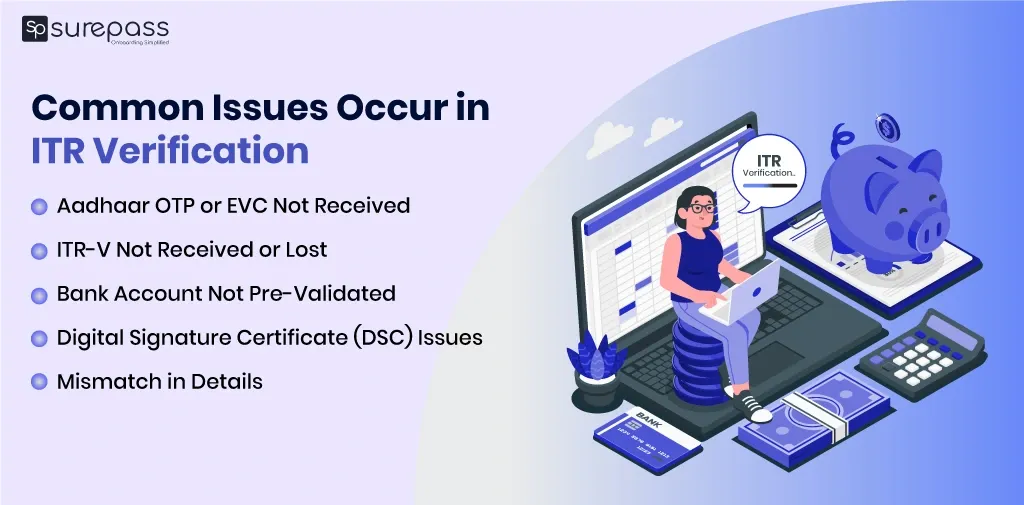
Common Issues in ITR Verification
E-Verifying an Income Tax Return (ITR) is a simple process, but taxpayers may encounter some issues.
- OTP not received for Aadhaar Based Verification: Ensure that the Aadhaar is linked to PAN and to the registered mobile number. Check network issues and resend the OTP. If the OTP still doesn’t receive, update your mobile number on the UIDAI website.
- Invalid Digital Signature Certificate (DSC) Error: The DSC is not recognized or shows an error during verification. Check if the DSC is registered on the e-Filing portal. Install or update the DSC management utility from the e-filing website. Use the correct USB token and ensure the signature is valid.
- Error in Electronic Verification Code Generation: If due to some reason, the Electronic verification code does not get generated. Ensure that the bank account/demat account is pre-validated on the e-Filing portal. You can also use an alternative method like Aadhaar OTP.
- Verification not completed in 30 days: If you miss the 30 days, the return is treated as invalid. Submit a condonation request by following these steps (e-Filing portal → Services → Condonation Request → ‘Delay in submission of ITR-V’). Give a genuine reason for missing the verification. If it is approved, you can verify the return.
Conclusion
ITR Verification is an essential process. It confirms that the return is valid. The department starts processing it only after verification. e-Verification offers a quick and paperless way to complete the process through Aadhaar OTP, net banking, DSC, EVC, or a bank. Apart from online, you can send a signed ITR-V form to the CPC office. It is good to do verification within 30 days, which prevents issues like invalid returns, loss of refunds, and penalties.
FAQs
Ques: Is it mandatory to e-verify ITR?
Ans: Verification is a mandatory process. e-Verification is the quickest way, but you can also send a signed ITR-V by speed post.
Ques: Can I e-verify my ITR without logging in to the portal?
Ans: Yes, you can. Use the pre-login e-Verify option on the e-Filing portal with your acknowledgement number.
Ques: What is the 30-day deadline for ITR verification?
Ans: It is the deadline to e-verify your Income Tax Return (ITR). You must verify within 30 days of filing. If you miss it, the return is treated as invalid (not filed).
Ques: What is the fee for late ITR verification?
Ans: Under Section 234F (or Section 428 of the Income-tax Act, 2025) the fee for late ITR verification is:
- ₹1,000 if the total taxable income does not exceed ₹5 lakh.
- ₹5,000 if the total taxable income is more than ₹5 lakh.
Ques: Which banks allow to generate an EVC at the ATM?
Ans: Axis Bank, Canara Bank, Central Bank of India, ICICI Bank, IDBI Bank, Kotak Mahindra Bank, and State Bank of India. This service is offered by certain banks only.
Automate your KYC Process & reduce Fraud!
We have helped 200+ companies in reducing Fraud by 95%