The new Aadhaar App has been launched with many new security features, including masked Aadhaar, selective sharing, biometric lock, security PIN, QR scanning, etc. As online fraud, data breaches, and identity theft cases are increasing. Securing apps and documents is necessary. The new Aadhaar App gives control over the information.
What is a Biometric Lock Aadhaar App?
A biometric lock is the feature offered by the new Aadhaar App. It allows Aadhaar holder to lock and unlock their biometrics with just one tap. Biometric locking confirms that, except for the right Aadhaar holder, no one can access the biometric details.
What is the Aadhaar PIN Security?
It is a 6-digit PIN that an Aadhaar holder needs to set while setting up the new Aadhaar App. It is required to open the App, view Aadhaar profiles, and access the available services.
How to enable Aadhaar Biometric Lock (Step-by-Step)?
The Aadhaar Holder needs to download the new Aadhaar App on their mobile phone before enabling the New Aadhaar Biometric Lock:
- Set up 6 digit PIN
- Now tap on your profile
- Tap on Biometric Lock
Automate your KYC Process & reduce Fraud!
We have helped 200+ companies in reducing Fraud by 95%
How to set up the Aadhaar App PIN?
Follow the step-by-step guide to set up a security PIN in the Aadhaar App:
- Download the new Aadhaar App from the Google Play Store and Apple App Store.
- Log in to the App with OTP verification and face authentication.
Tips for a strong PIN:
- Avoid birth dates
- Don’t use repetitive digits
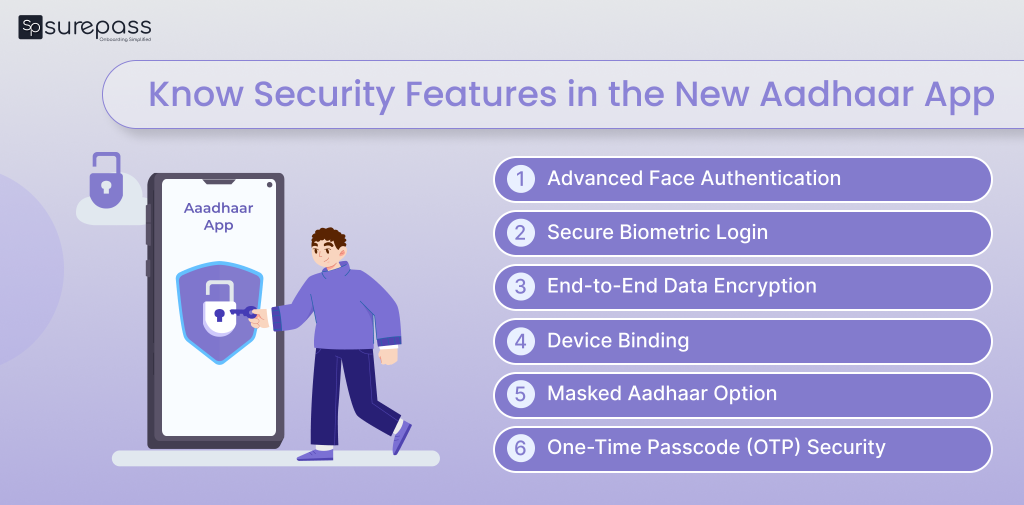
Know Security Features in the New Aadhaar App (2025)
These are new security features UIDAI has provided in the New Aadhaar App offer:
- Selective Data Sharing (Consent-Based Sharing): This feature of the Aadhaar App permits users to provide only the information needed for verification. Instead of providing a complete Aadhaar card. Selective Sharing Aadhaar with consent reduces the possibility of misuse of your identity in KYC rent hotels, checking hotel rooms, or on the internet.
- Masked Aadhaar for Safe Sharing: The app allows users to mask their Aadhaar with just one Tap. It is an ideal solution for travel bookings, hotels, HR onboarding, and SIM registration. It prevents exposure of the full Aadhaar number.
- Aadhaar Activity Logs: The new Aadhaar App offers detailed activity logs of Aadhaar holders. It helps you check when and where your Aadhaar was used.
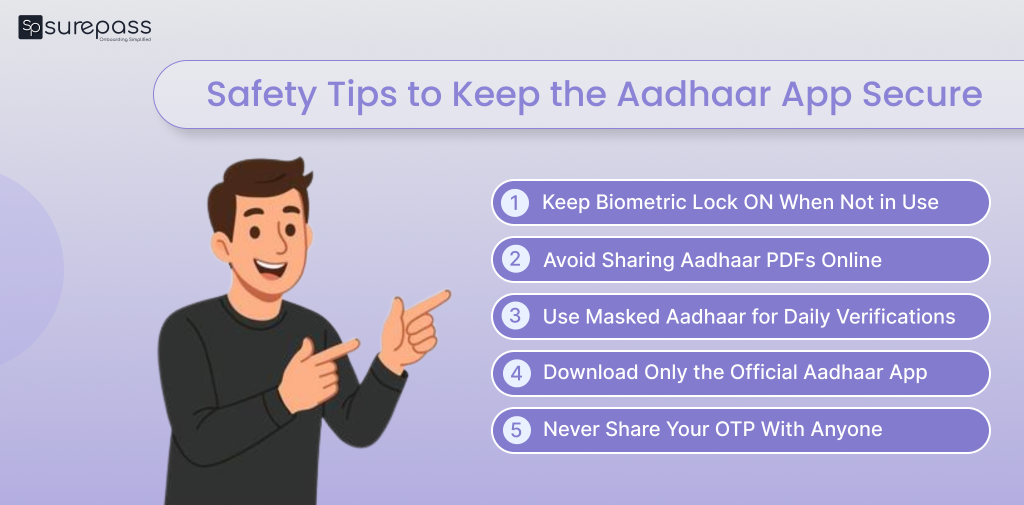
Safety Tips to Keep the Aadhaar App Secure
Each Aadhaar holder needs to keep their sensitive personal information private. It prevents the risk of identity theft.
- Keep the Biometric Lock ON, Not Using It: The biometric lock prevents unauthorized access to your fingerprints, face, and iris for verification. Turn the biometric lock on while verification, and after verification, turn it off. It is the most effective way to prevent unauthorized biometric use.
- Do Not Share Aadhaar PDFs on WhatsApp or Social Media: The Aadhaar PDFs contain all the demographic and biometric information of a person. Sharing it over the message app or email increases the risk of misuse. That’s why we use selective sharing and the masked aadhaar feature.
- Use Masked Aadhaar for Hotels, KYC, and Courier Pickups: Use Masked Aadhaar while hotel check-ins, courier pickups, and office entry. It prevents exposure to the full Aadhaar details.
- Install only the Official Aadhaar App from the Play Store or App Store: To avoid malware or fake apps, download the new Aadhaar app from Google Play Store or Apple App Store. Fake Aadhaar apps can steal personal data or OTP.
- Never Share Your OTP with Anyone: UIDAI, Banks, telecom companies, and government departments never ask for OTPs. If anyone asks for OTP, it might be a fraud attempt. Your OTP can be used for unauthorized login.
Conclusion
The new Aadhaar App has come with many security features that help Aadhaar cardholders secure their information. These features are a biometric lock, selective sharing, security PIN, QR scanning, and more. For the setting of a security PIN, you must install the Aadhaar app and go through the verification procedure. Once you have verified it, create the security pin for the App. To activate the biometric lock, start by opening the Aadhaar profile. Tap on the profile screen, then click on the biometric lock option.
FAQs
Ques: What is the biometric lock Aadhaar App?
Ans: The biometric lock feature in the Aadhaar App helps the Aadhaar holder to lock the biometric just with a tap.
Ques: Why should the Aadhaar holder use the biometric lock?
Ans: It prevents the misuse of biometric information.
Ques: Is it safe to store multiple Aadhaar profiles in the App?
Ans: Yes, it is safe to store multiple Aadhaar Profiles in the App.
Ques: How do I set up the Aadhaar App PIN?
Ans: Follow the simple steps to set up the Aadhaar App PIN:
- Download the new Aadhaar App from the Google Play Store or Apple App Store.
- Log in through OTP verification.
- Complete Face authentication.
- Create a secure 6-digit PIN.
Ques: Is a masked Aadhaar valid for verification?
Ans: Yes, Masked Aadhaar is accepted as valid proof.
Automate your KYC Process & reduce Fraud!
We have helped 200+ companies in reducing Fraud by 95%