Whether you have made an update request for name, mobile number, or DOB in your Aadhaar card, and want to check the update status. You need to get your URN Number. It helps you track whether your request is rejected, in progress, or accepted. Here, in this article, you learn about URN Number in Aadhar Card and how to get URN Number.
What is URN Number?
URN (Update Request Number) is a 14-digit code ex. 0000/00222/0XXXX. It helps track Aadhaar card details updates. It is temporarily valid for 15 days from the date of generation. When a person requests an Aadhaar card update, they get an acknowledgement slip that contains the Aadhaar URN Number. In simple words, this number helps you check the update request status.
How to Get URN Number?
Follow these simple steps to get the Aadhar urn number:
Online: Get URN Number from the UIDAI Portal
- Visit myAadhaar portal
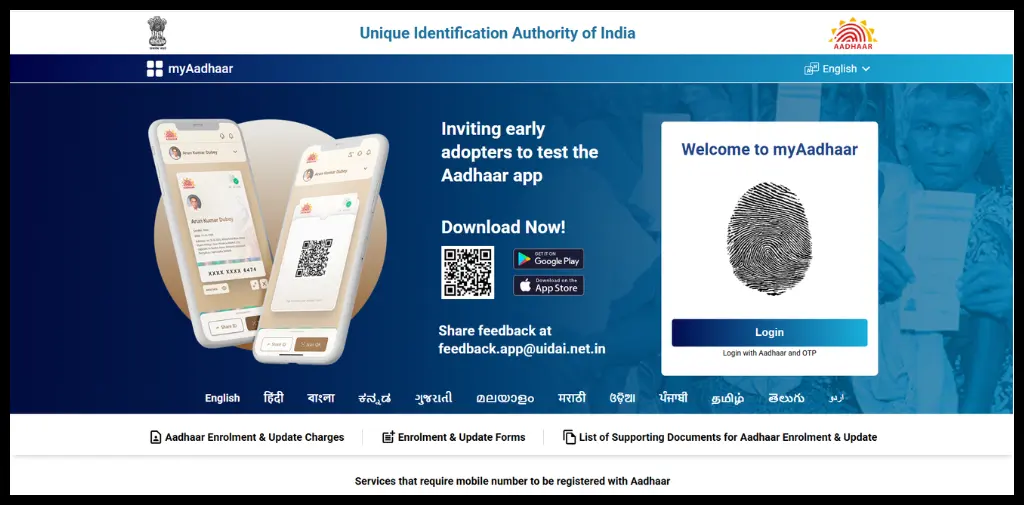
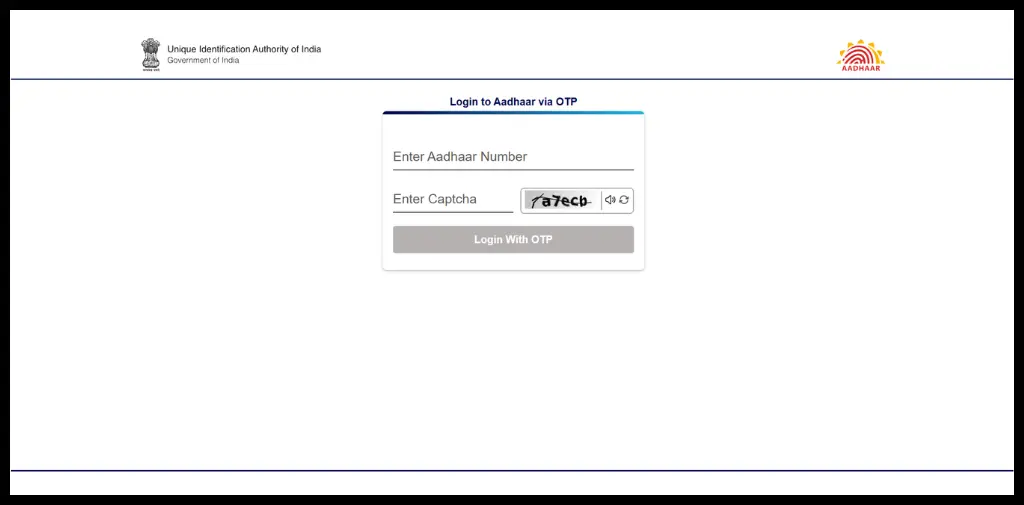
- Login with Aadhaar number and OTP.
- Click on the Name/Gender/DOB and address update tab.
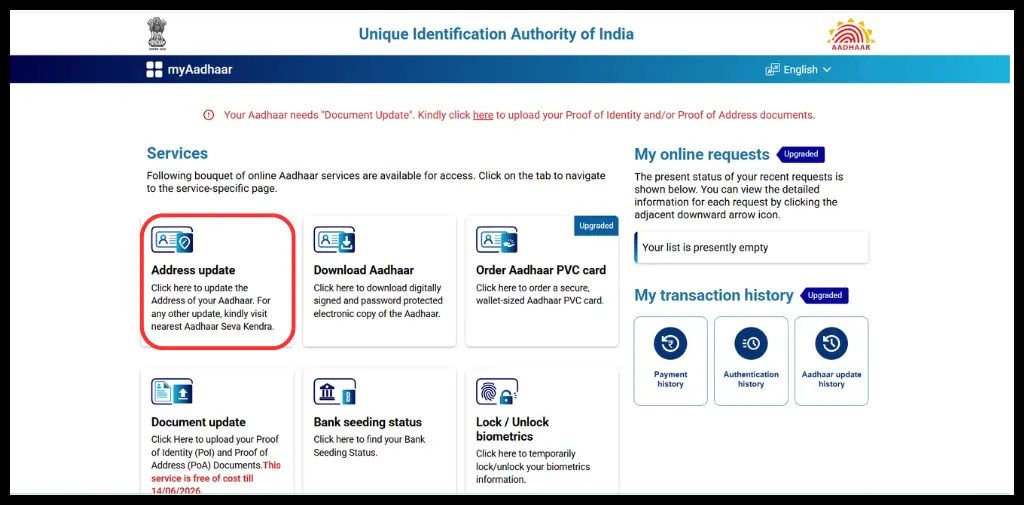
- Select the update detail (Name, DOB, Gender, Address)
- Enter the updated details, upload the supporting documents, and click on submit
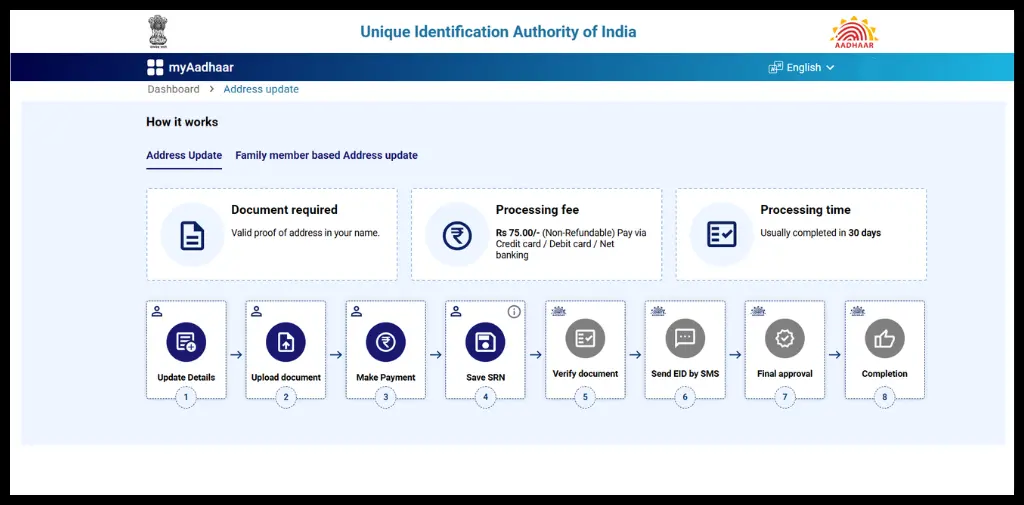
- After successful submission, get URN
Offline: Get URN Number from the Aadhaar Enrollment Center
- Visit the nearest Aadhaar Enrollment Center
- Submit Aadhaar Update request
- Receive URN
Automate your KYC Process & Reduce Fraud!
We have helped 3000+ companies in reducing Fraud by 95%
How To Check Aadhar URN Number Status Online?
You can check the URN status easily by visiting the UIDAI portal.
- Go to the UIDAI Website
- Click on “Check Aadhaar Update Status”
- Enter the URN Number and other required details.
- Click on Submit
- Get Update Status
From Aadhaar Enrolment Centre
- Checking your Aadhar URN number offline is quite easy:
- Go to the nearest Aadhaar Enrollment Centre along with the acknowledgement slip
- Give your Aadhaar number and URN number to the authorized person
- An authorized person will help you check the status through the UIDAI system
Toll-Free Method
Apart from the UIDAI website and enrollment centre, you can check the URN number status via the UIDAI toll-free number 1947.
URN Status Results
When you check the status, it can show one of the following results:
Approved/Successful: Your update request is processed and accepted.
Under processing/Pending: Your Request is under verification.
Rejected: Your request has been declined due to errors or missing information.
Invalid URN Message
Sometimes, while checking the update status, you can get an invalid URN message. It can occur due to typo mistakes, using extra spaces, or slashes. So, carefully enter each digit without any mistakes. But if you are getting an invalid message, even if you are entering the correct number, it may indicate that your request is in a processing state.
Wait for some time and try later. If the issue continues, contact UIDAI support, [email protected]. Apart from them, you can also visit the Aadhaar enrollment center for help.
What is the URN Number on Aadhaar Card?
Actually URN number is not present or printed on the Aadhaar card. Many people often get confused that the URN is a part of the Aadhaar card.
URN is an update request number. You get this number when you apply for an update or correction in Aadhaar details, such as changing name, address, DOB, mobile number, etc. When you submit this update request, you receive acknowldgement slip which contains this number.
The main purpose of this number is only to track the status of the Aadhaar update request (approved or rejected). After the update is completed, it becomes inactive and no longer useful. In simple words, it is a temporary reference number for checking updates, but not a part of the Aadhaar card.
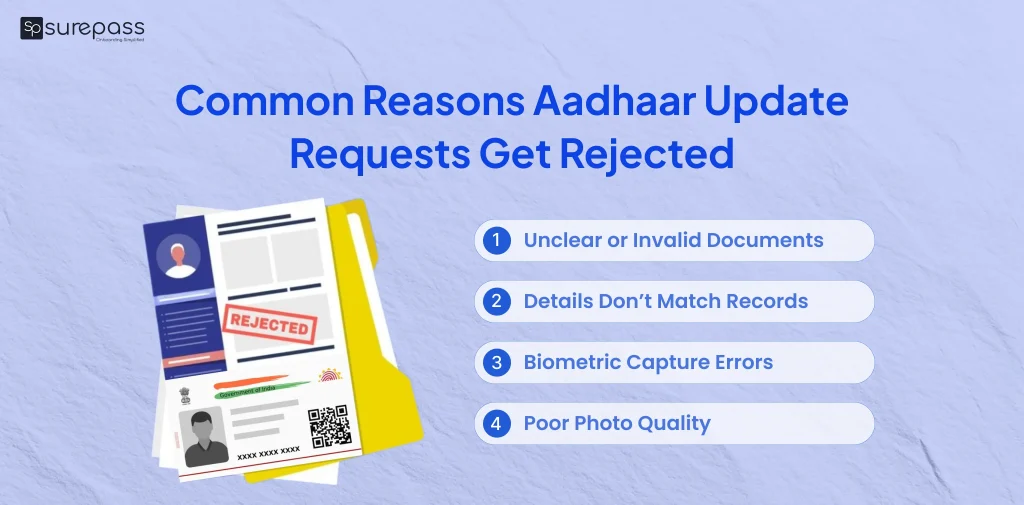
Common Reasons For Update Requests Getting Rejected
UIDAI may decline the Aadhaar update application if there are mistakes or missing information in your submission. Some of the reasons include:
- Uploaded documents are unclear, outdated, or not properly verified.
- The details you have entered during the submission do not match the official records.
- The biometric data was not captured correctly.
- The submitted photo is blurred and does not meet the quality guidelines.
- Errors like wrong spelling, incorrect DOB, or incomplete forms are found.
- The address and contact information are missing, invalid, or incorrectly filled.
If your update request has been rejected, kindly check the mentioned issue. After that, submit the application again with correct and valid documents.
Conclusion
Tracking your Aadhaar update becomes easy with the URN number. You can request and check their status online and offline with the help of this number. Whether you have applied for the changes in the name, DOB, or mobile number. This Aadhaar URN number helps you stay updated on the progress.
You can get URN number after submitting an Aadhaar update request by following the above-mentioned steps. You can also check the URN status to find whether your Aadhaar update application is approved or rejected. If your application gets rejected, check the mentioned issues and submit the application again. If there are no issues in the document and submission process, contact UIDAI for help.
FAQs
Ques: What Is URN Number?
Ans: URN is the update request number you get after submission of the Aadhaar update request. It helps you track the status of the application.
Ques: How Many Digits Are In Aadhar URN number?
Ans: There are 14 digits in the URN number.
Ques: What Is The Full Form Of URN?
Ans: The full form URN is Update Request Number.
Ques: How Can I Track My Aadhaar Card Update Request?
Ans: Yes, you can track the Aadhaar card update request with the URN.
Ques: What Is Validity Of Aadhar urn number?
Ans: It is usually valid for 15 days from the date of generation.
Ques: Can I Track Multiple Updates With One URN?
Ans: No, you cannot track multiple updates with one URN.
Ques: What To Do If URN Status Shows Rejected?
Ans: Check the mentioned issue on the status page, then correct the mistakes, and submit a new update request.
Ques: How to get URN Number?
Ans: Go to Aadhaar enrollment for update request and get URN number.
Ques: Is URN The Same As EID?
Ans: No, both of them serve different purposes. EID is 28 digit enrollment ID that is generated for new enrollments, while URN is 14 digit number assigned to track updates to existing Aadhaar details.
Ques: What If I Lose My URN?
Ans: If you have lost the update request number go to Aadhaar enrollment centre for help.
Ques: How To Find Aadhaar URN Number?
Ans: You can find this number on the acknowledgement slip.
Ques: What to do if the acknowledgment slip is lost?
Ans: Visit the Aadhaar Enrollment Center with a valid ID for help.
Automate your KYC Process & Reduce Fraud!
We have helped 3000+ companies in reducing Fraud by 95%