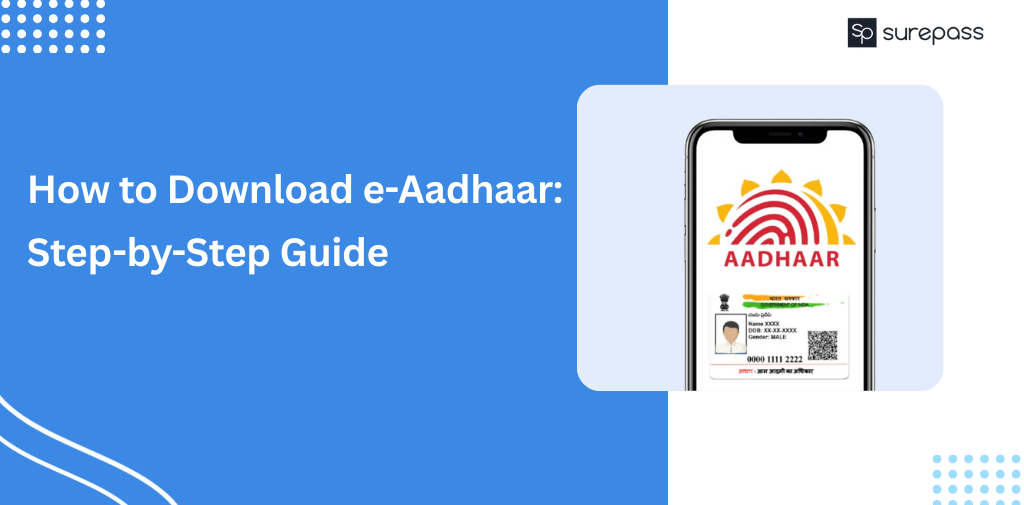
With the eAadhaar download facility by UIDAI, Aadhaar can be downloaded quickly and easily. You can get a digitally signed Aadhaar copy within minutes. This can be used for KYC, government services, or personal needs and is fully online and paperless.
Aadhaar card download and Get eAadhaar often confuse users. This guide aims to clear these confusions and will direct you through the official process of Aadhaar download, using your registered mobile number. Furthermore, you will learn how to verify your Aadhaar and open the PDF without having to go to a centre.
What is an eAadhaar card?
An eAadhaar Card is a digital copy of your Aadhaar Card that is issued by UIDAI. It is a PDF file containing your details, photo, and QR code, and it is secure and digitally signed.
eAadhaar Download: Steps
eAadhaar card download is completely secure with UIDAI. To complete your eAadhaar download correctly, follow the procedures listed below.
- Go to the UIDAI website: Go to the UIDAI myaadhaar portal and head to the Download Aadhaar section. This is the only website that is able to grant permission to download a valid eAadhaar PDF.
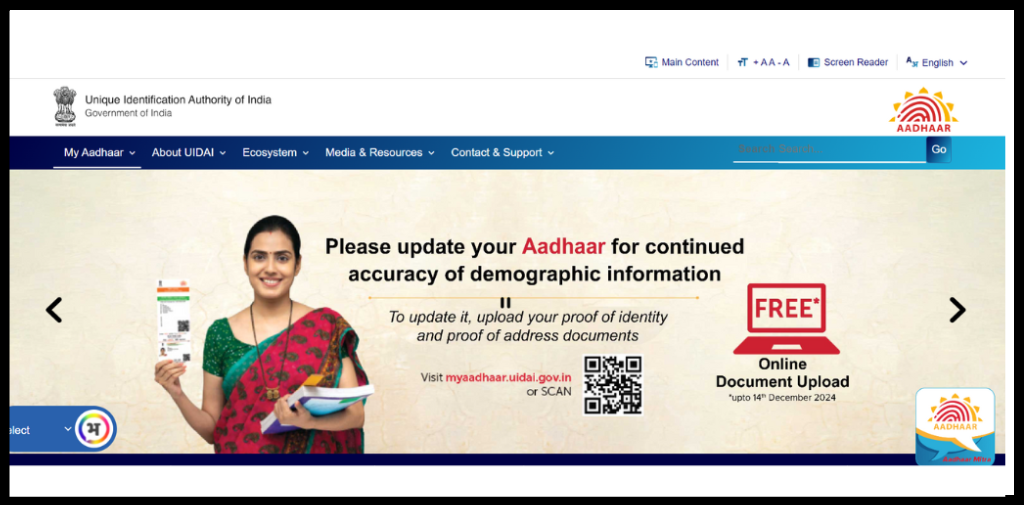
- Fill in your Aadhaar details and captcha: Select the option of ID you’d like to get Aadhaar, these may be your aadhaar number or virtual ID or enrolment ID or SID, and then fill the captcha.
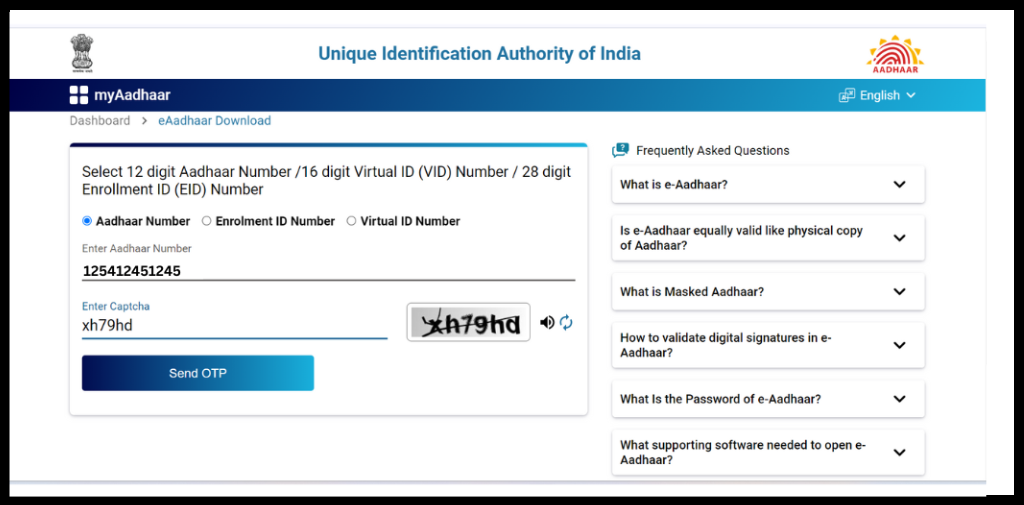
- Make an OTP and verify: After filling out the captcha, click on Send OTP. An OTP will be sent to your mobile number that is tied to your Aadhaar-registered number. Enter the OTP to confirm your identity.
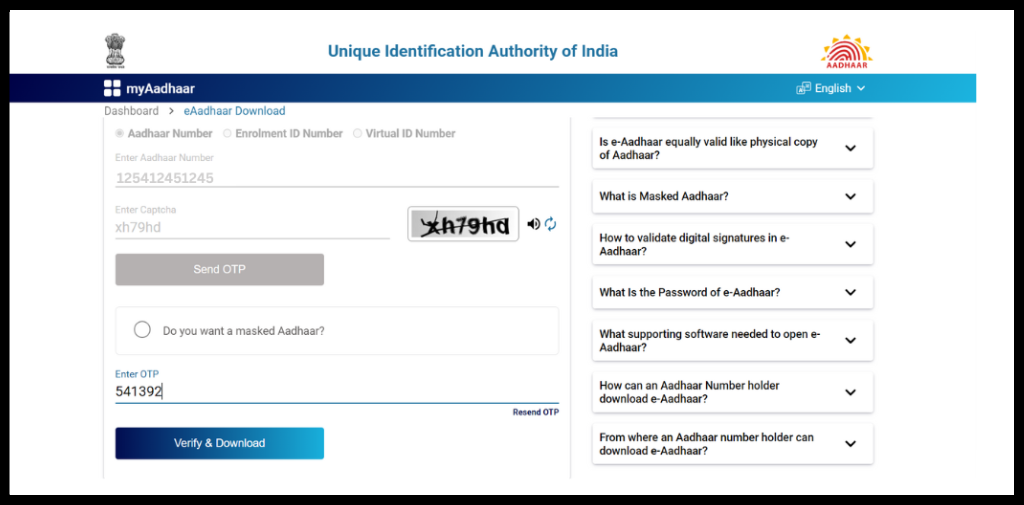
- Choose the eAadhaar download option: After the OTP is verified, an option appears that allows you to download masked eAadhaar for added privacy. Click the masked aadhaar card download checkbox if you want that and continue.
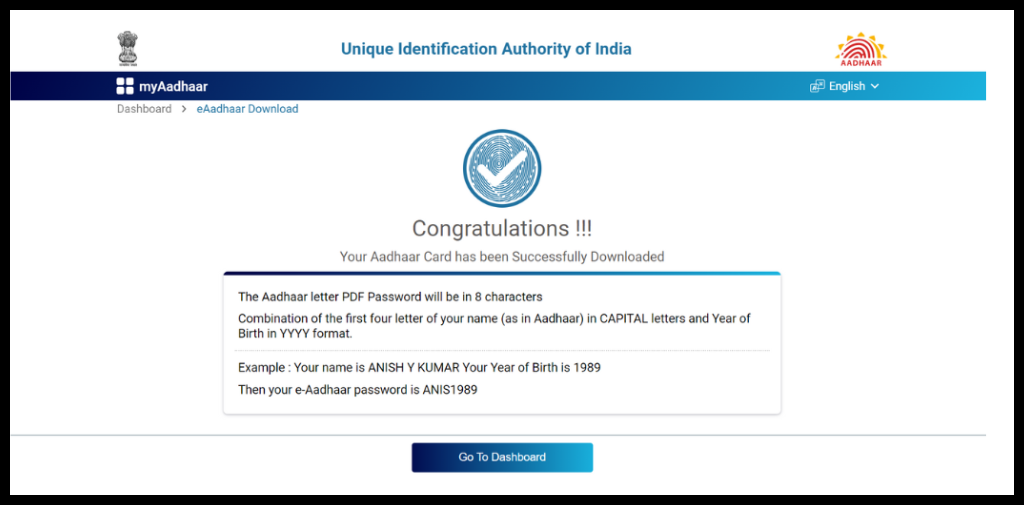
- Download the eAadhaar: Click on Download Aadhaar to save the eAadhaar PDF to your device. The PDF is protected by a password. This digital copy is legally valid and is ready to be used for official purposes.
Why to download eAadhaar Card?
eAadhaar download is a way to get a legally valid digital ID without having to visit an Aadhaar centre. An eAadhaar is issued by UIDAI and can be stored digitally and is accepted everywhere a physical Aadhaar card is needed. It can also be used for Aadhaar KYC verification with banks, NBFCs, and services involving mutual funds and insurance.
Automate your KYC Process & Reduce Fraud!
We have helped 3000+ companies in reducing Fraud by 95%
Common Mistakes to Avoid:
The process for downloading eAadhaar cards is simple, but you may run into problems due to minor, easily fixable issues. Please avoid the following common mistakes to get your eAadhaar card:
- Phone number not linked to Aadhaar: To download eAadhaar, you need to verify your One Time Password (OTP). If your phone number is not connected to Aadhaar, you will not be able to proceed further and get an eAadhaar card.
- Using the wrong Aadhaar number or enrollment details: OTP generation will fail if the details you entered are not correct, please avoid typos and double-check your details before generating the OTP.
- Closing or refreshing the page before you receive the OTP: If you navigate away from the page after clicking Send OTP, it may cancel the OTP, and you will have to start the verification from the beginning. Complete the verification on the same page and wait for the OTP.
. - Not clicking the checkbox for masked eAadhaar download: After the OTP verification, you need to click on the checkbox in order to download the masked eAadhaar. If you skip this, you will only get aadhaar card, not the masked variant.
- Entering the wrong password: The downloaded eAadhaar card pdf will not open without a password. Please note that the UIDAI gives the format of the password once the download is completed, and enter the password following that format.
- Downloading from unauthorized websites: Only proceed with aadhaar download from the UIDAI website and stay away from third-party sites that claim to do the same to protect your information.
Download Masked eAadhaar Card Using Surepass API
Downloading a masked eAadhaar, which hides the first eight digits of the Aadhaar number, preserves user privacy and is a valid document for KYC and onboarding use cases. This is valid for KYC use cases.
Instead of relying on manual eaadhaar download and masking, businesses can automate the process using the Surepass Aadhaar Masking API. The API masks Aadhaar numbers and returns a secure document which can be used for KYC.
This system is good for organisations that need Aadhaar-based verification and want to retain strong data security and compliance with regulations.
Conclusion
Downloading eAadhaar online is a simple and secure process when done through the official UIDAI portal. With OTP-based verification and a digitally signed PDF, eAadhaar card provides a legally valid proof of identity that can be accessed anytime without visiting an Aadhaar centre.
By following the correct steps and avoiding common mistakes, you can perform eAadhaar download online pdf confidently for KYC, government services, and other official purposes. Always ensure you use the official UIDAI website to keep your personal information safe and your Aadhaar document valid.
FAQs
Ques: How can I download my eAadhaar card online?
Ans: You can download your eAadhaar card online from the official UIDAI website by entering your Aadhaar number, Virtual ID (VID), or Enrollment ID (EID), verifying your identity using an OTP sent to your registered mobile number, and downloading the password-protected PDF.
Ques: Why am I not receiving the OTP for eAadhaar download?
Ans: If you are not receiving the OTP, it may be because your mobile number is not linked with Aadhaar or there might be a network problem.
Ques: Is eAadhaar legally valid for KYC and government services?
Ans: Yes, eAadhaar is legally valid and has the same status as a physical Aadhaar card. It is accepted for KYC, banking, government schemes, income tax purposes, and identity verification across India.
Ques: Can eAadhaar download work without a registered mobile number?
Ans: No, you cannot download eAadhaar without a registered mobile number. OTP verification is mandatory, and the OTP is sent only to the mobile number linked with your Aadhaar.
Ques: What is the difference between regular eAadhaar and masked eAadhaar?
Ans: Regular eAadhaar displays your complete Aadhaar number, while masked eAadhaar hides the first eight digits and shows only the last four digits for better privacy.
Automate your KYC Process & Reduce Fraud!
We have helped 3000+ companies in reducing Fraud by 95%