You can now easily change your address through the Aadhaar App. You don’t need to visit Aadhaar Sewa Kendra and wait in line. The New Aadhaar App address update feature allows you to complete the address change process through your mobile phone. You can also change the details in your family member’s Aadhaar card through the app. Just follow this simple step-by-step guide and change the address in your Aadhaar card using the Aadhaar app.
Requirements to Change the Address in the Aadhaar Card Using the New Aadhaar App
You must have these things to change your address in the Aadhaar card:
- Aadhaar-linked mobile number.
- Valid Proof of Address (Passport, Bank Passbook, Voter ID, Ration Card, and other documents).
- ₹75 (Online payment).
- Already downloaded the New Aadhaar App.
- Smartphone with a camera for face authentication.
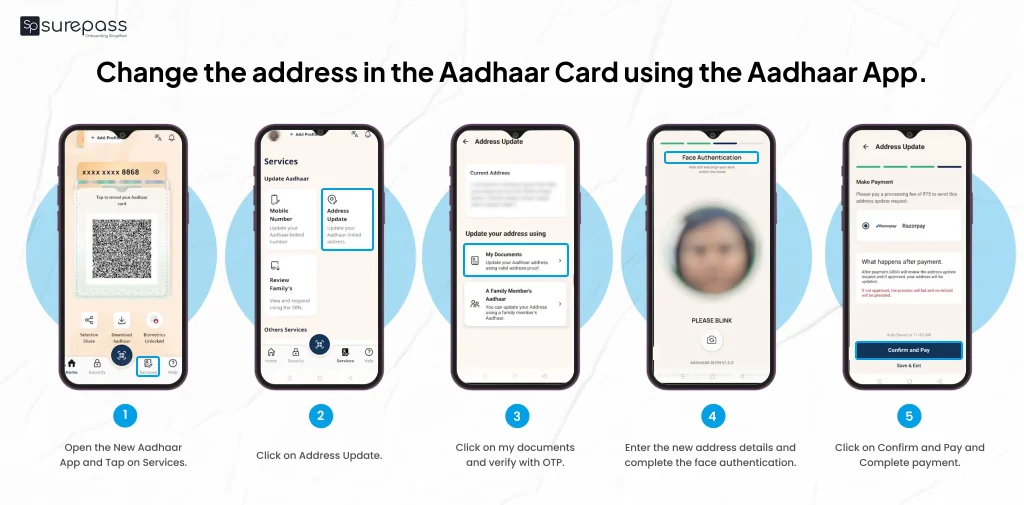
How to change the address in the Aadhaar Card using the Aadhaar App?
Before changing the address, download the New Aadhaar App, complete the verification process, and set a six-digit PIN.
- Open the New Aadhaar App.
- Tap on Services.
- Click on Address Update and click on my documents.
- Verify with OTP and upload the document (Scan or Select File).
- Click on Continue to enter the new address.
- Enter the new address details and complete face authentication.
- Click on Confirm and Pay.
- Complete payment.
Automate your KYC Process & Reduce Fraud!
We have helped 3000+ companies in reducing Fraud by 95%
How to check the Address Update Status in Aadhaar?
You can check the Aadhaar update status in the app under the Track My Request section. For a family request, you need to enter the SRN number to track the Aadhaar update status by tapping the family request icon on the Aadhaar App.
How long does an Aadhaar Address change take?
Usually, the Aadhaar address change takes 3 to 30 days. Most address change requests are completed within 30 days. However, if the address is not updated even after 90 days, you can contact UIDAI.
- Toll Free Number: 1947 (Available, Mon to Sat, 7 AM to 11 PM), (Sun, 8 AM to 5 PM)
- Email Support: [email protected]
- Grievance Redressal: https://pgportal.gov.in/
Change Address in Aadhaar Card (Offline)
If, for any reason, you have difficulty updating your address via the Aadhaar App. You still have the alternative to visit an Aadhaar Seva Kendra. You can book an appointment through the UIDAI or directly visit the nearest Aadhaar Sewa Kendra in your locality with your Aadhaar, Aadhaar-linked mobile number, and Address proof document. Request the Address Change form and submit it. Complete biometric verification, pay the fee, and receive an acknowledgement slip with URN number.
Valid List of Address Proof Documents to Change Address in Aadhaar Card
Here is the list of proof of address you must know before applying for an address change in Aadhaar
- Bank Statement or Passbook
- Passport
- Post Office Account Statement or Passbook
- Ration Card
- Voter ID
- Driving License
- Government Photo ID Card / PSU Service ID
- Electricity Bill (not older than 3 months)
- Water Bill (not older than 3 months)
- Landline Telephone Bill (not older than 3 months)
- Property Tax Receipt
- Credit Card Statement (not older than 3 months)
- Insurance Policy
- NREGA Job Card
- Pensioner Card
- Kisan Passbook
Conclusion
Changing address in Aadhaar has become so easy with the new Aadhaar App. Just follow the above step-by-step guide to change the address on the Aadhaar card. You can easily check the status of the update through the App. In case you face delays or difficulties in the address update. You can contact UIDAI by calling the helpline number 1947 or email support [email protected]. The provided list of addresses helps you carry the document you require to change your address. In case you fail to change your address in your Aadhaar card using the new Aadhaar app or other online methods, go to the nearest Aadhaar Sewa Kendra. Apart from the address change, you can also change your mobile number through the App.
FAQs
Ques: How to update the address in the Aadhaar card using the Aadhaar App?
Ans: Just follow the steps below:
- Open Aadhaar and log in with PIN
- Tap on Update Address
- Upload document
- Pay fee
Ques: Can we update an Aadhaar address online by ourselves?
Ans: Yes, you can change or update your address in your Aadhaar card by yourself through the Aadhaar App and the UIDAI Portal.
Ques: What proof do I need to change my address on my Aadhaar Card?
Ans: You need valid address proof documents like a passport, voter ID, and an electricity bill.
Ques: How long does it take to update the address in Aadhaar?
Ans: It takes around 5 to 7 days and a maximum of 30 days.
Ques: How can I check my Aadhaar address update status?
Ans: You can check the Aadhaar address update status through Track My Request in the new Aadhaar app.
Ques: Can I update my Aadhaar Address without proof of Address?
Ans: Yes, you can update the address with the consent of the head of family (HOF). If you don’t have address proof in their own name.
Ques: Can I update a family member’s Aadhaar Address using the Aadhaar App?
Ans: Yes, you can update a family member’s Aadhaar Address using the Aadhaar App.
Automate your KYC Process & Reduce Fraud!
We have helped 3000+ companies in reducing Fraud by 95%